Which Antennas Should You Plug Into Home Assistant Green (And Why Having Both Is Magic)
Out of the box, Home Assistant talks to Wi-Fi devices (Sonos, Ubiquiti, Apple TV, Ecobee). By plugging in two tiny ~$30 USB antennas — a Zooz Z-Wave 800 Stick and a Zigbee / Thread Antenna — you unlock thousands of ultra-reliable local switches, locks, glass-break sensors, and $12 battery sensors with zero brand hubs!
What Home Assistant Green + Both Antennas Actually Look Like in Real Life
Here is my actual setup at home — a silent Home Assistant Green box paired with both the Connect ZBT-2 (Zigbee/Thread) and Connect ZWA-2 (Z-Wave Long Range) desktop antenna towers sitting cleanly out in the open for maximum whole-house range:
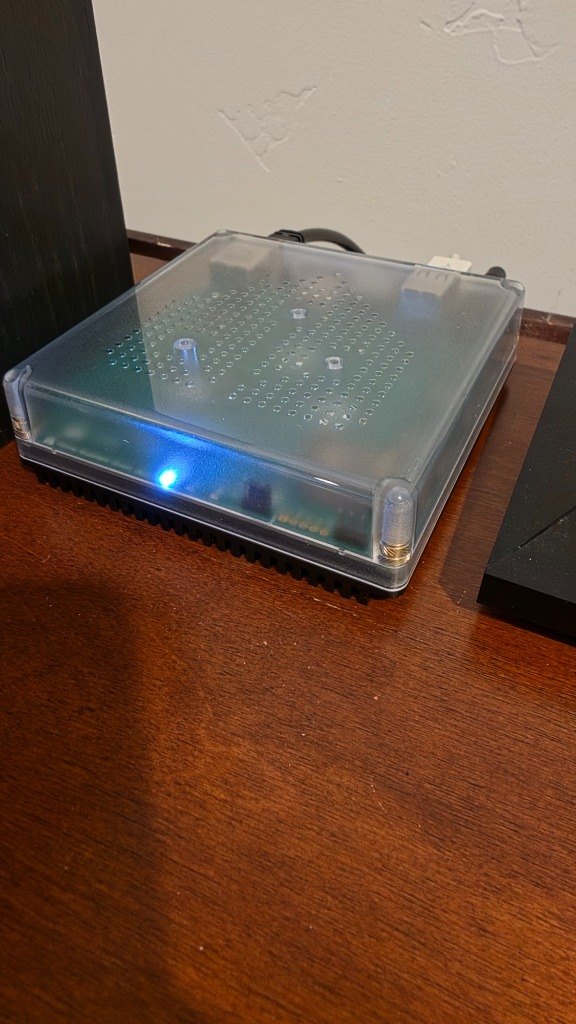
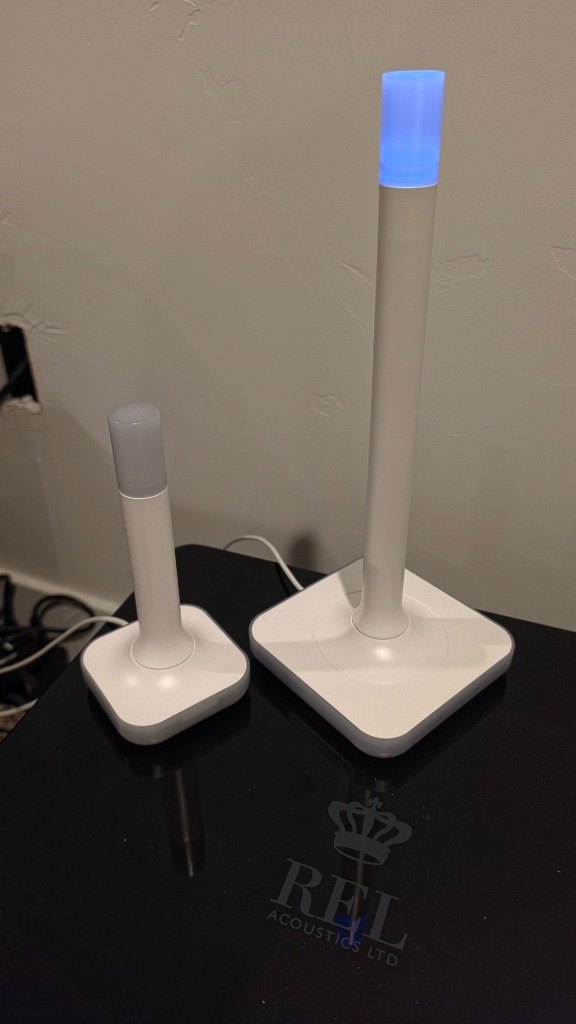
How Easy Are They to Connect to Home Assistant Green (or a Mini PC)?
Home Assistant Green has two built-in USB-A ports on the back specifically designed for one Z-Wave antenna and one Zigbee/Thread antenna!
Plug two $9 shielded 3-foot USB 2.0 extension cables into the back of Home Assistant Green, and plug your Zooz Z-Wave stick into one and your Zigbee stick into the other ~12 inches apart (keeps them away from board RF noise!).
You don’t install drivers or type commands. Within 10 seconds, Home Assistant pops up two blue cards on your Settings screen: "Discovered Zooz 800 Z-Wave Stick" and "Discovered Zigbee Radio".
Click Configure → Submit. Home Assistant automatically sets up Z-Wave JS and Zigbee Home Automation (ZHA). Now you can pair any brand’s switches, locks & sensors in seconds!
Zooz Z-Wave vs. Zigbee / Thread — Why Smart Homeowners Run BOTH (~$68 Total)
Each radio frequency has physics superpowers the other doesn’t. Having both plugged in means you can always buy the highest-rated or best-priced device on Amazon without ever worrying which radio it uses!
Zooz 800 Series Z-Wave Long Range Stick
- • Zero Wi-Fi Interference: Runs at 908 MHz — miles away from crowded 2.4 GHz Wi-Fi routers and microwaves.
- • Punches Through Metal & Plaster: Ideal for in-wall light switches (Zooz, Inovelli), smart deadbolts (Yale), Ring glass-break sensors & keypads, and Zooz Titan water shutoff valves.
- • Up to 1-Mile Long Range: Reaches detached garages, gates & mailboxes effortlessly.
Zigbee 3.0 / Thread Antenna (SONOFF or HA ZBT-1)
- • Ultra-Cheap Tiny Sensors ($9–$16): Outfit 20 windows, 8 sinks, and every bedroom temp/humidity sensor for pennies with Aqara, ThirdReality & SONOFF!
- • Color Bulbs & mmWave Radars: Connects Philips Hue bulbs, SONOFF mmWave presence radars, and SmartWings motorized window shades directly with zero brand bridges.
- • Self-Healing Mesh: Every $9 Zigbee smart plug boosts signal across your whole house.
Interactive Antenna Picker — Choose Your Setup
Official Home Assistant Connect ZWA-2 (Z-Wave 800 Long Range Antenna Tower)
- What I personally use! Upright tuned tower design gives dramatically stronger signal reach than tiny thumb sticks.
- Built-in weighted desktop base & cord keep the radio cleanly away from motherboard/USB noise out of the box.
- Glowing top status LED + 1-click official updates directly inside Home Assistant.
Official Home Assistant Connect ZBT-2 (Zigbee 3.0 / Thread Antenna Tower)
- Matching compact companion tower to the ZWA-2 (shown side-by-side in my photo on this page!).
- Runs either your whole-home Zigbee 3.0 mesh OR Matter-over-Thread with rock-solid low latency.
- Replaces proprietary Aqara, Hue, SONOFF, and Tuya bridges with one clean desktop stand.
Zooz 800 Series Z-Wave Long Range USB Stick (ZST39 LR)
- Uses 908 MHz sub-GHz radio waves that punch right through plaster, brick, floors, and metal wall switch boxes without ever fighting your Wi-Fi!
- Unlocks UL-listed smart wall switches (Zooz, Inovelli, Leviton), deadbolt locks (Schlage, Yale, Kwikset), Ring Z-Wave glass-break/keypads, and Zooz Titan water shutoff valves.
- Z-Wave Long Range (ZWLR) reaches detached workshops, gates, and curbside mailboxes hundreds of feet away.
SONOFF Zigbee 3.0 USB Dongle Plus (ZBDongle-E / P External Antenna)
- Unlocks thousands of ultra-affordable $9–$18 battery sensors (Aqara, ThirdReality, SONOFF, IKEA) for every door, window, sink, and room.
- Replaces 5 different proprietary brand bridges (Aqara Hub, Hue Bridge, SONOFF Bridge, Tuya Zigbee Hub) with ONE local antenna!
- Rotatable metal external dipole antenna + aluminum housing drastically improves signal reach.
Official Home Assistant Connect ZBT-1 (Formerly SkyConnect)
- Includes the required USB extension cradle right in the box so you don’t forget it.
- Can be flashed with 1 click in your browser as either your primary Zigbee coordinator OR a dedicated Thread Border Router for Matter devices.
- Directly supports open-source Home Assistant development.
Shielded USB 2.0 Extension Cables (3ft–6ft, 2-Pack)
- The #1 beginner mistake is plugging radio sticks flush into a computer port right next to noisy USB 3.0 / SSD electronics.
- Moving your Zooz Z-Wave stick and Zigbee stick just 3 feet away on shielded cords eliminates dropped packets.